
RDF: How We Move Rohlik's Data, Faster and Cheaper
Rohlik's data is spread across dozens of databases in five countries. RDF (Rohlik Data Fleet) is our in-house tool for moving it where it is needed, driven by a few lines of YAML. How it works, why we built it instead of paying for a third-party platform, and how batching and Apache Arrow (ADBC) made it six times cheaper than the platform it replaced.

What RDF is
Rohlik Group runs online grocery stores in five countries: Czechia, Germany, Austria, Hungary and Romania. Each country has its own set of databases, one per service (think of the e-shop, the warehouse or the delivery fleet), mostly on MySQL with a few on Postgres. Some data lives in BigQuery, business teams keep lookup tables in Google Sheets, and there are more sources besides.
Rohlik Data Fleet (RDF) moves data from wherever it lives to wherever it is needed. A source can be a MySQL or Postgres replica, a BigQuery project or a Google Sheet; a destination can be Snowflake, a MySQL reporting database or BigQuery. Each load simply says where to read from and where to write to, and the list of supported routes keeps growing. In practice most of the traffic goes into Snowflake, where our analytics and forecasting run. Today that means more than a hundred tables and a few thousand loads a day.
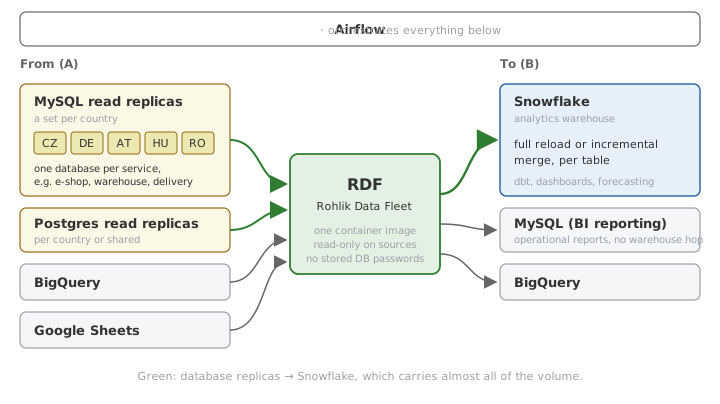
Technically, RDF is a Python application packaged as a container and run as a Cloud Run job, with Airflow deciding what to load and when. Every load starts its own short-lived execution, so we pay only while data is actually moving.
Why we built it
For years these loads ran on a third-party data platform. It extracted each country separately, so one table meant five jobs, and by mid-2026 that added up to more than 12,000 jobs a day, each billed in credits.
That model charged for how often we refreshed, not for how much data we moved. In July, a configuration refreshed every 15 minutes moved about 100 MB in the whole month and still cost more than one that moved 80 GB.
The work itself is simple: read from a replica, write Parquet, load into Snowflake. So we built it ourselves and started moving tables in August 2026. What used to cost thousands of dollars a month now costs a few hundred. For every $100 we paid the platform, we now pay $17.
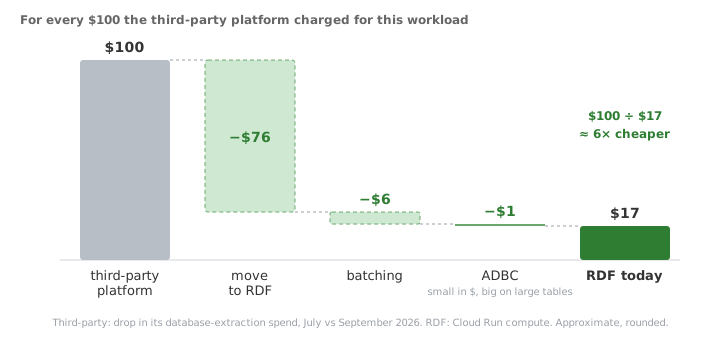
The comparison covers platform credits against Cloud Run compute. Snowflake is billed to our own account in both setups, and the engineering time to build RDF is not included.
Why not an open-source tool?
A fair question, especially since we already run Airbyte at Rohlik. It works well for the use cases we have it for, but it doesn't solve this one.
Reading a table and writing it somewhere is the generic, easy part. What makes our loads ours is everything around it: one query fanned out to five country replicas, country-unique ids, local-time conversion, Cloud SQL IAM authentication and a publish step that fits our Snowflake conventions. With Airbyte or a similar tool, we would still write all of that as custom code, and on top of it run and upgrade the tool itself.
RDF is about 5,000 lines of Python that we fully understand, small enough for any of us, or an agent, to read end to end. It does exactly what we need and nothing else.
How it works: all you need is YAML
Using RDF is deliberately simple. More and more of our work is done by AI agents, so we wanted a format that both people and agents get right on the first try: plain YAML.
The file has two parts. The header says where in Snowflake the tables should land. Below it is a list of tables, and each entry has a source alias, a plain SQL query and a few options that control how the result is loaded. A simplified example:
snowflake_database: DWH_PROD_TRANSFORM
snowflake_schema: TR_LEVEL_0_LOGISTICS

tables:
  - table_name: delivered_orders
    source_db: rohlik                     # a source alias, not a hostname
    incremental: true                     # MERGE instead of a full reload
    primary_keys: unique_id
    unique_ids: true                      # id -> unique_id, courier_id -> courier_unique_id
    datetime_columns: "created_at, delivered_at"   # UTC -> local time of each country
    derived_columns: |
      created_by_unique_id: created_by || '_' || country
    sql_script: >-
      SELECT id, courier_id, created_by, delivery_slot, total_price,
             created_at, delivered_at, updated_at
      FROM rohlik.orders
      WHERE updated_at >= DATE_SUB(UTC_TIMESTAMP(), INTERVAL 3 HOUR)
    column_descriptions: |
      delivery_slot: Delivery window chosen by the customer.
      delivered_at: When the courier handed the order over (local time).
You write the query once. rohlik is an alias, not a hostname: RDF runs the query against the matching replica in each of the five countries and stacks the results into one Snowflake table with a country column. Unlike the old setup, that is one execution for all five countries, not five separate jobs.
The other options:
| Option | What it does |
|---|---|
unique_ids: true | Ids are only unique within a country, so order 1234 exists in Czechia and in Germany. RDF adds a *_unique_id column next to every id and *_id column (1234_cz), so cross-country joins just work. |
derived_columns | The same for columns outside the naming convention, like created_by. |
datetime_columns | Shifts UTC timestamps to each country's local time. |
incremental: true | Merges the rows returned by the query (here, changed in the last three hours) into the existing table on unique_id, instead of replacing it. |
column_descriptions | Become column comments in Snowflake. That is what AI agents and our semantic layer read to understand what delivery_slot means, and people benefit too. |
Parallel reads, chunking, batching and retries all happen inside RDF, so whoever writes the file, human or agent, never has to think about them. Agents go beyond the YAML, too: the ADBC migration described later in this post was first drafted by Devin, one of our coding agents, and then tested and validated by us.
Under the hood: one load
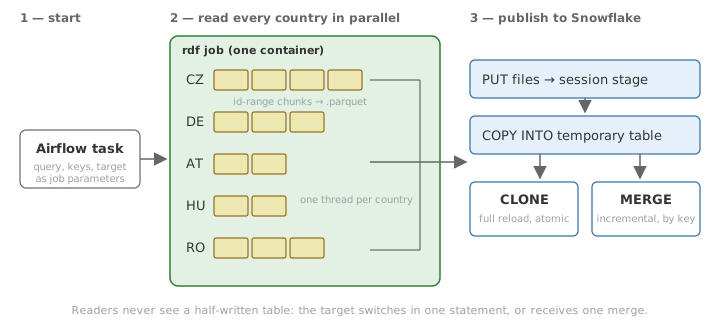
Every load goes through the same three steps:
- Read. All five countries are read in parallel, one thread each. Tables with an
idcolumn are read in id ranges. Each range becomes its own Parquet file and can be retried alone if a replica connection drops, which also keeps memory bounded. - Stage. The Parquet files are uploaded to a temporary Snowflake stage and loaded into a temporary table with
COPY INTO. - Publish. A full reload swaps the target with
CREATE OR REPLACE TABLE ... CLONE, a zero-copy metadata operation that is atomic. An incremental load runs aMERGEon the primary key instead.
Either way, nobody querying the target ever sees a half-written table.
Two questions every data engineer asks at this point: schema changes and deletes. A new column in the source simply shows up in Snowflake. A full reload takes the new schema as is, and an incremental merge adds missing columns to the target before merging. Rows deleted in the source disappear on the next full reload. Incremental tables rely on the soft-delete columns in the source (deleted_at, is_deleted), which arrive as ordinary updates.
Batching: paying for the start-up once
Every RDF execution pays two kinds of cost:
| Cost | What it is | Dominates for |
|---|---|---|
| Fixed overhead | 40–50 s container start-up, a Snowflake session and the publish step | Small tables, which is most of them |
| Per-row work | Reading rows and converting them to Parquet | Large tables |
Batching attacks the first cost, ADBC the second.
Originally every table had its own execution, so a table with 10–30 seconds of real work paid more for starting the container than for moving the data. With batching, several tables share one execution and load back to back in the same container. Each table is isolated: a failure in one does not stop the others, and tables from a failed batch are retried one by one.
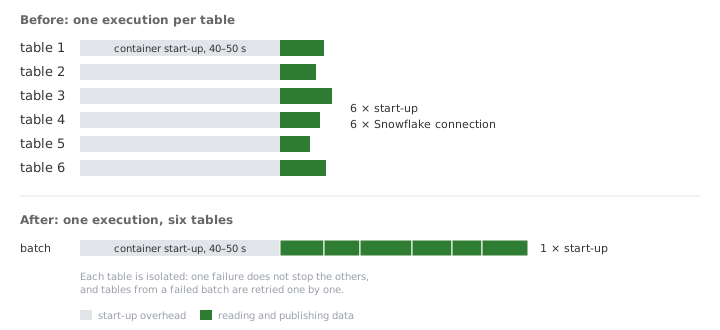
| Before | After | |
|---|---|---|
| Executions per day, whole fleet | ~3,700 | ~1,900 (−49%) |
| Busiest pipeline (3 tables every 3 minutes) | 1,440 a day, 39% of all executions | 480 a day |
| Cost per original $100 (chart at the top) | $24 | $18 |
Batching is now the default: any pipeline that loads three or more tables batches them.
ADBC: reading columns without converting them to rows
Batching made the small tables cheap. The large ones were a different story: most of their time went not into waiting for the database, but into Python converting data from one shape to another.
The fix came from a conference. ADBC came up in several talks at dbt Summit in Las Vegas, and when we got back we decided to try it against our existing Python read path.
The problem: rows in, columns out
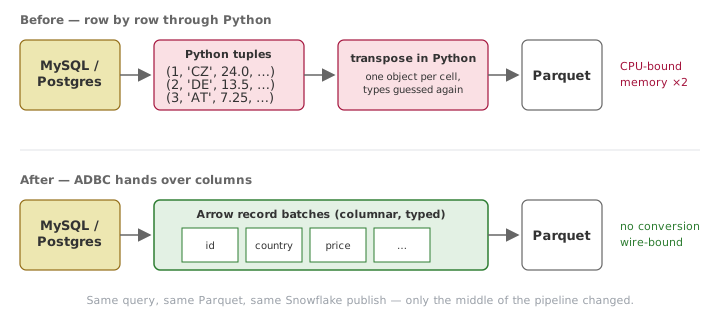
The original read path used the standard Python drivers, mysqlclient for MySQL and psycopg2 for Postgres. Both implement the Python DB-API, which returns every row as a tuple of Python objects. Parquet stores data by column, so our code had to collect the tuples and transpose them into columns before writing a file. For a table with 2.5 million rows and more than 100 columns, that is about 250 million Python objects created and thrown away, and for a while the data sits in memory twice: once as tuples, once as columns.
What ADBC changes
ADBC (Arrow Database Connectivity) is a database API from the Apache Arrow project. It plays the same role as ODBC or JDBC, but a query returns a stream of Arrow record batches instead of rows. The driver writes values straight into typed columnar buffers, and those go directly to the Parquet writer without ever becoming Python objects. The Postgres driver, for example, reads results over the binary COPY protocol instead of the row-by-row text protocol.
| Before | After | |
|---|---|---|
| MySQL driver | mysqlclient (DB-API) | ADBC MySQL driver, installed with dbc |
| Postgres driver | psycopg2 (DB-API) | adbc-driver-postgresql |
| Query result | Rows as Python tuples | Arrow record batches |
| Path to Parquet | Transposed in Python | Written directly |
Everything else stayed the same: chunking, retries, the Parquet layout and the Snowflake publish. The only code we had to port was the handling of transient replica errors, because ADBC raises different exception types than the old drivers.
Before switching, we ran the old and new versions side by side, and schemas, row counts and table hashes matched. The one intentional difference: Postgres json columns now keep the database's original text (24.000 rather than Python's 24.0).
Results
On the 2.5-million-row table, with both versions running at the same time against the same replicas:
| Before (DB-API) | After (ADBC) | Change | |
|---|---|---|---|
| Runtime | 211 s | 133 s | −37% |
| Peak memory | 7.3 GB | 6.1 GB | −16% |
| Compute cost per run | $0.033 | $0.019 | −42% |
The memory reduction matters as much as the speed. With the old path, this table was killed by the out-of-memory killer on a standard 8 GiB task and could only finish on a 16 GiB one. The new path fits within 8 GiB.
In production, we compared the first day after the switch with the preceding week. Cloud Run and Snowflake load varies a lot over the day, so we compared windows at the same time of day and with the same number of executions (3,112 in each). That matters: our first quick comparison, a multi-week average against a single day, showed Snowflake costs up 23%. Compared day by day, they had not changed at all.
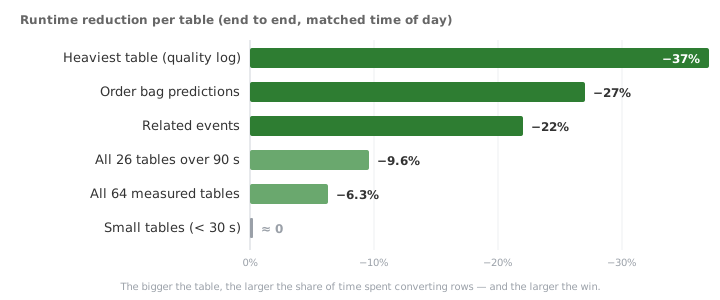
Billed Cloud Run time dropped by 5.7%. Hourly tables now arrive in Snowflake 1.5–3.6 minutes earlier. Snowflake credit usage did not change, since the warehouse does the same work as before. None of the database loads failed on the first day.
Why the $1 step still matters
In the cost chart at the top, ADBC is the smallest step: $1 out of every original $100. That is not because ADBC barely helped. The move and batching had already cut the bill to $18, and 5.7% of a small bill is a small number. The fleet average also hides where ADBC works. In a small table, a few seconds of reading sit between a 40–50 second start-up and the publish step, so there is little to speed up.
The large tables are where it pays off, as the chart above shows: 22–37% faster, and the biggest one now fits in memory where it used to crash. Batching removed the fixed overhead that dominated thousands of small loads. ADBC removed the per-row cost that dominated the few big ones, and that is what keeps those tables fast, fresh and within memory limits as they grow.
The bottom line
For every $100 the third-party platform charged for this workload, we now pay about $17: $76 saved by the move itself, $6 by batching and $1 by ADBC. $100 ÷ $17 is roughly six times cheaper, and the data arrives sooner.
What's next
We want RDF to become the default way to move data around Rohlik, not only into Snowflake. The plan is to keep adding sources and destinations, so that a team can choose where its data comes from and where it should go, and get there with a YAML entry instead of a new pipeline.
We have also started testing Apache Iceberg internally. In the near future we would like to move to the Iceberg format, so that our data is open to more tools than just Snowflake. Who knows, maybe that will be the next article you get to look forward to.
Thanks
RDF is a team effort. A big thank you to the whole Data Engineering team: every one of us has contributed to it in some way, whether by writing code, migrating pipelines, reviewing changes or simply using it every day and telling us what was missing.