
Show and Tell #2: From Solo Developer to AI Architect
Second in our Show and Tell series. On going from a solo developer overwhelmed by requests to an architect directing a team of AI agents — and the exact workflow, tools, and rules that made it possible.
This is the second post in our Show and Tell series. Engineers walk the team through their workflows, tools, and daily habits in a live session. This post is a written summary of that session — condensed, but covering all the key ideas.
I'm the only developer on the marketing tech team. Directly serving a full marketing organization.
At some point, the requests stopped being manageable. Campaign launches, content updates, tooling changes, integrations — all landing on one person. The delivery was blocked not because I was slow, but because the model was fundamentally broken. One developer versus many stakeholders, with no way to scale.
The tempting answer was to work faster. Use Claude Code or Codex, tab through autocomplete, ship more code per hour. But that's still linear. You hit a ceiling and it doesn't move.
The real problem turned out to be something different: I didn't have a workflow system. Not an AI problem — a meta-problem. Once I fixed that, everything changed.
The Core Insight
Most people using AI agents are still the bottleneck. They open Claude Code or Codex, type a prompt, read the output, correct it, type again. The AI is faster, but the human is still in every loop.
"Most people struggle not with agents — they struggle with what happens before they open one."
The shift I made was structural. Instead of treating AI as a smarter autocomplete, I started treating it as a team. My job stopped being implementation and became something else: defining work clearly, delegating it, and validating the output.
In practice, that means I own exactly two moments in any task. The initial input — and the final validation. Everything between is delegated.
The Async Workflow
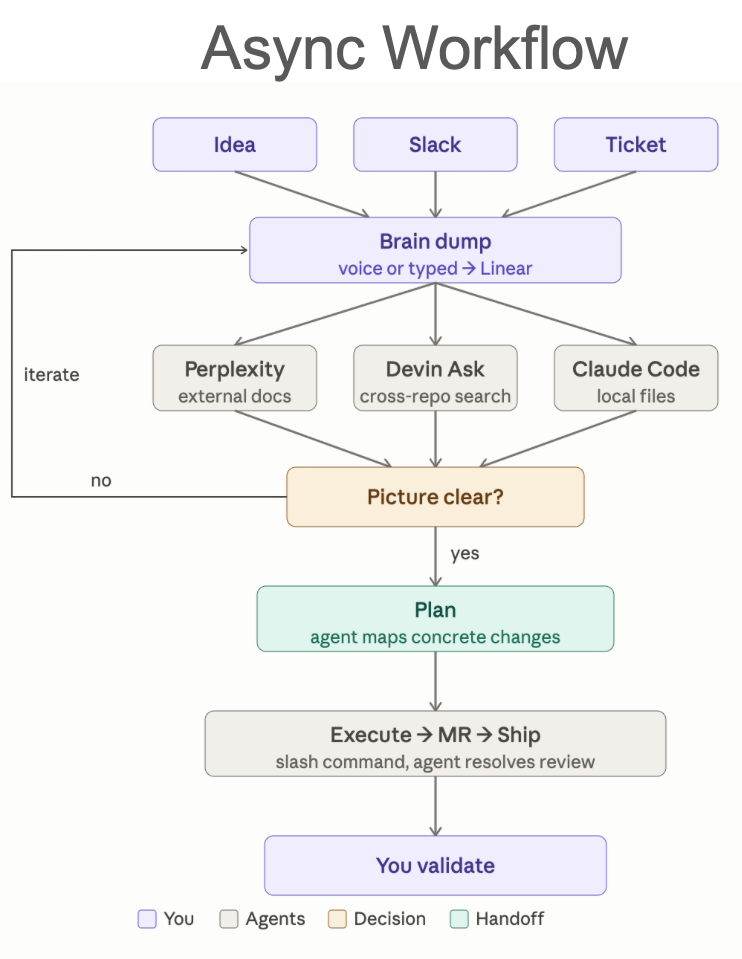
This is the core of how I work now. Every task, regardless of size, moves through the same pipeline.
Step 1: Brain Dump
A task arrives from three possible places: something in my head, a Slack message, or an existing Linear ticket. It doesn't matter which — they all go into the same place.
I use Spokenly (a local voice-to-text tool running Nvidia Parakeet) to dump everything I know about the task into a note or directly into Linear. Raw, messy, incomplete. Thoughts, context, constraints, related things I remember. The goal is maximum context capture, not structure.
The agent's job is to make it structured. My job is to get the raw material out fast.
Step 2: Research
Once the context is in one place, agents go find what's relevant. Three tools, three search spaces:
- Perplexity — external documentation, industry context
- Devin Ask — cross-repo search, what exists in the codebase
- Claude Code — local files, project-specific context
I don't tell the agent which files to look at. I give it the raw context and let it discover what's relevant. You bring the what — it finds the where.
Step 3: The Decision Gate
After research, I read what came back. One question: is the picture clear enough to plan?
If not, I iterate — add context, ask the agent to look somewhere else, clarify the idea. If yes, we move to planning.
This gate is where most failed agent sessions actually break down. Not in execution. People skip the clarity check and go straight to implementation, then wonder why the output is wrong. The spec was wrong. The picture wasn't clear.
Step 4: Plan
The agent maps out concrete changes. Files, functions, interfaces, dependencies. I review the plan and either approve it or push back. Approving a bad plan locks you into bad execution — this is the step worth spending time on.
Step 5: Execute, MR, Ship
Once the plan is approved, the agent executes. It creates the branch, writes the code, runs tests, generates an MR with a summary and linked Linear ticket — all via a custom /create-mr slash command. I spend one to two minutes reviewing the architecture and outcome. Then I merge.
Devin vs. Claude Code
Every task that arrives, I run through two questions:
- Does it cross repositories, or are the files not local?
- Does a pattern already exist in the codebase?
If either answer is yes — that's Devin. It follows existing patterns, works across repos, and I review the output asynchronously. I can walk away and come back when it's done.
If both answers are no — that's Claude Code, and I stay.
"Every task I get, I run through two questions. That's it. Two questions, and I know exactly what to open."
The distinction matters more than it looks. Anything that defines how the system works — a new component, a new integration, an architectural decision that others will follow — that stays with me and Claude Code. Not because I'm writing the code, but because every decision made here will be the foundation. I need to own that.
"I design the blocks. Devin improves, adjusts, and expands them. The moment I've established a pattern, it stops being my job to implement it again."
When a big feature can't be one-shotted, I split it at the pattern boundary. Build the core with Claude Code until the pattern is clear. Then break the rest into tickets and hand each one to Devin. Not splitting by file count — splitting by whether the pattern exists yet.
Local Setup
The philosophy here: keep it simple and concise. Add only when necessary. Every tool in the agent's environment should give targeted information — never bloat the context window.
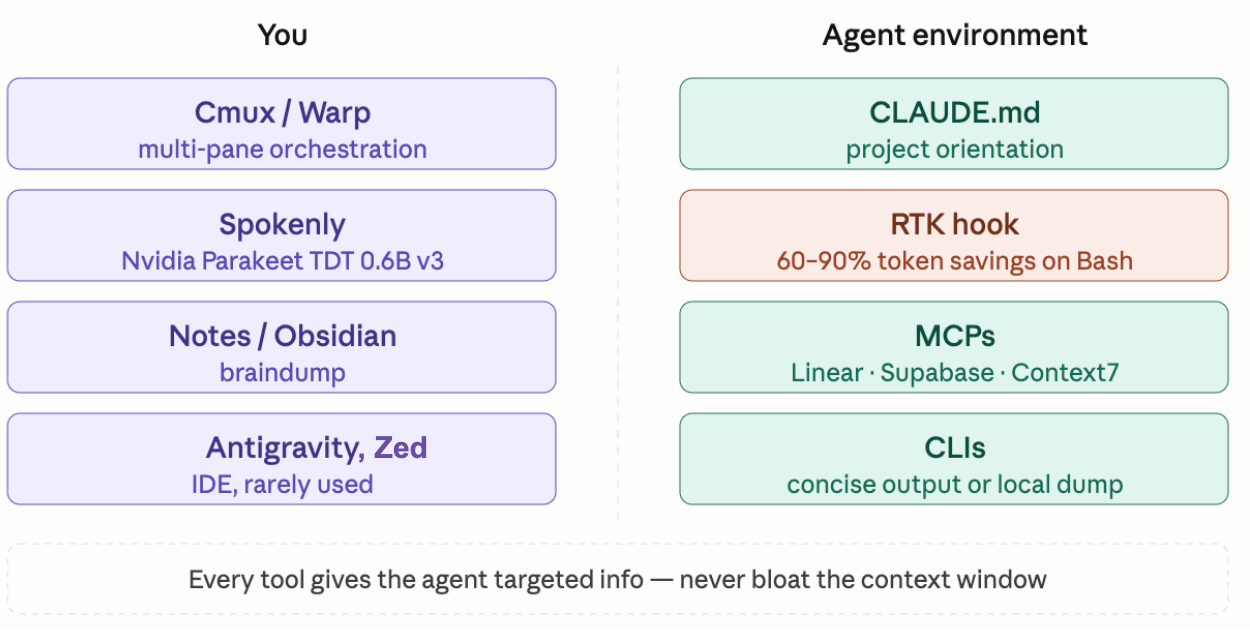
My side:
- Cmux / Warp — multi-pane terminal orchestration to manage agent sessions, servers, and logs simultaneously
- Spokenly — local voice-to-text (Nvidia Parakeet TDT 0.6B v3) for fast brain dumps without switching context
- Notes / Obsidian — staging area for ideas before they hit Linear
- Antigravity / Zed — IDE, rarely opened
Agent environment:
- CLAUDE.md — project orientation, conventions, context the agent needs at session start
- RTK hook — a Rust-based proxy that rewrites bash commands to compressed output, giving 60–90% token savings on common operations
- MCPs — Linear, Supabase, Context7 wired in directly
- CLIs with concise output —
rohlik-queryfor database access,langfusefor trace analysis,agent-browserfor web browsing without ballooning context
On Claude Code plugins: I actively avoid installing too many. Every plugin you add increases the context window on every session — even when it's irrelevant. Most become black boxes you forget about. Fewer tools, used intentionally, is better than a full kitchen you never clean.
Eight Rules for Working With Agents
"Build the system that lets agents do the work — and spend your time deciding what's worth building."
1. Failure is a spec problem. Almost never the model. Almost always the framing. When an agent produces bad output, the first question is: what was unclear in the instructions? Rewrite the spec before blaming the AI.
2. The 10-minute rule. If you've been fighting an agent for more than 10 minutes and it still doesn't understand you — stop. Don't keep prompting. Start a fresh session with a clearer explanation. Continuing is sunk-cost thinking.
3. The 70% rule. Context windows degrade past 70% capacity. You'll notice the outputs getting worse, the agent missing earlier context. Split the task or kill the session and restart. Don't fight it.
4. Plan mode first. Generate a markdown plan. Approve it. Then execute. Never skip this — even for tasks that feel small. The plan surfaces misunderstandings before they become code.
5. Smart access, no copy-paste. Stop pasting logs, code, or database rows into the chat. Give agents the tools to fetch that information themselves — CLI tools, MCPs, database access. Only paste your raw thoughts. Everything else should be queried, not copied.
6. Review architecture only. Define the inputs, outputs, and contracts. Delegate syntax, tests, and deployment. Your eyes should be on systemic decisions, not line-by-line implementation.
7. Babysit → extract → skill. When an agent doesn't know how to do something, walk it through once. Then immediately ask it to extract that workflow as a reusable skill or slash command. Every manual step is future automation. Save what works, reuse it.
8. The double door. When an agent does something unexpected, ask it why before correcting it. Agents often see context you missed — a failing background tool, a conflict in the codebase, something from earlier in the session. Work with them, not at them.
The Multiplier Question
The question I ask myself whenever I notice a pattern: how would I do this 100 times without spending more time?
Not "how do I do it once faster." That's still linear.
Step back. Identify the pattern. Automate or optimize it. Then never do it manually again.
This is what separates AI-assisted from AI-native. Assisted is using AI to go faster at the same tasks. Native is using AI to eliminate the task category entirely.
What Actually Changed
The bottleneck moved.
Before, I was the constraint. Every ticket waited for me to have time to open my laptop and write code. Now the constraints are different: quality of the spec, clarity of the plan, how quickly I can review output.
Those are better problems to have.
Correct thinking is the new scarcity. Your workflow is the operating system. Be wrong faster.
If any part of this is useful to steal, steal it. And if you've built something better — I want to see it.